After uploading a pathology file you receive an uploadId. Use the status endpoint to check whether processing has completed and whether your callback was delivered successfully.
You can also check the status of your uploads visually on the Records page in the client portal — no API calls needed.
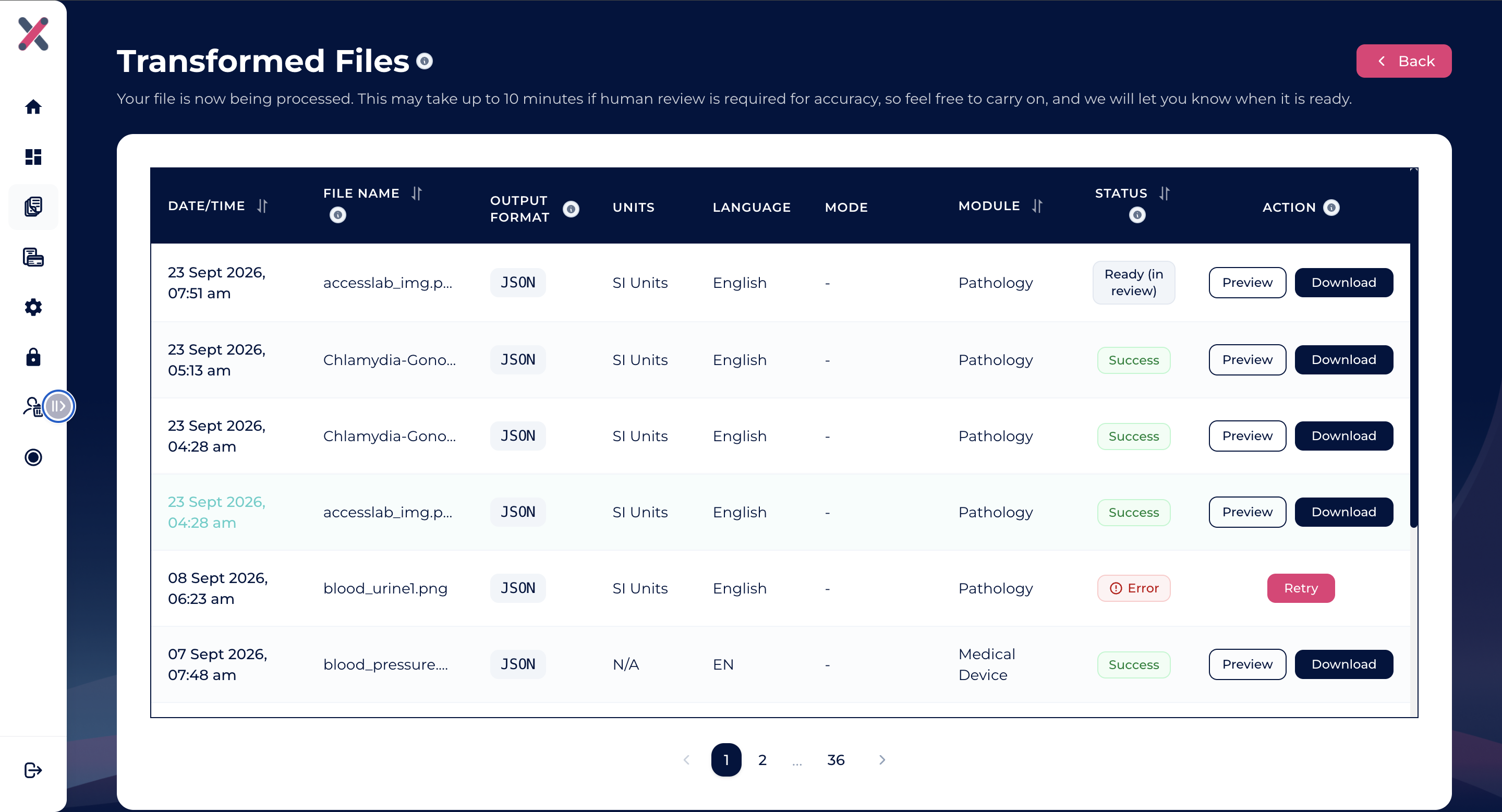
The Records page in the client portal displays real-time status badges and allows immediate inspection of your transformed files:
| Portal Status | Description |
|---|---|
| Processing | Extraction and transformation are currently in progress. |
| Ready (in review) | Processing and automated QA checks are complete. Preliminary QA-passed results are immediately ready for preview or download while any flagged items undergo human QA review. |
| Success | All processing and verification are 100% complete. Final verified results are available. |
| Error | Processing failed. An error callback is dispatched if configured. |
For records with Ready (in review) or Success status, a Preview button appears next to Download on the Records table:
- Instant text preview: Click Preview to open a modal rendering your transformed output (JSON, HL7, FHIR JSON, FHIR XML, CSV) directly in your browser without saving a file.
- Preliminary data notice: Previewing a record with status Ready (in review) displays a preliminary notice confirming that you are viewing QA-passed rows while manual review finalizes remaining rows.
- Modal download: You can review biomarker data and trigger the file download directly from within the preview modal or from the main table.
- Binary formats: For binary formats like Parquet, preview is omitted — click Download to save and inspect the file in your preferred data tooling.
GET https://app.jondax.eu/api/v1/status/:uploadId
Authorization: Bearer <JONDAX_API_KEY>
Authentication uses your API key (the same one used for uploads) — no session JWT is required.
curl --location 'https://app.jondax.eu/api/v1/status/:uploadId' \
--header 'Authorization: Bearer <JONDAX_API_KEY>'{
"success": true,
"data": {
"uploadId": "<uploadId>",
"customerId": 1,
"transactionId": 478,
"fileName": "image (3).png",
"status": "completed",
"createdAt": "2026-06-03T07:41:10.633Z",
"completedAt": "2026-06-03T07:58:20.426Z",
"callbackDelivery": {
"status": "delivered",
"attempts": 1,
"lastAttemptAt": "2026-07-07T01:58:58.446Z"
},
"expiresAt": "2026-07-03T07:41:10.633Z"
}
}{
"success": true,
"data": {
"uploadId": "<uploadId>",
"customerId": 1,
"transactionId": 478,
"fileName": "image (3).png",
"status": "processing",
"createdAt": "2026-05-29T11:36:02.152Z",
"completedAt": "2026-05-29T12:14:50.708Z",
"callbackDelivery": {
"status": "pending",
"attempts": 0,
"lastAttemptAt": null
},
"expiresAt": "2026-06-28T11:36:02.152Z"
}
}{
"success": true,
"data": {
"uploadId": "<uploadId>",
"customerId": 1,
"transactionId": 478,
"fileName": "image (3).png",
"status": "uploaded",
"createdAt": "2026-05-30T05:18:12.185Z",
"completedAt": "2026-05-30T05:24:43.555Z",
"callbackDelivery": {
"status": "pending",
"attempts": 0,
"lastAttemptAt": null
},
"expiresAt": "2026-06-29T05:18:12.185Z"
}
}| Field | Type | Description |
|---|---|---|
data.uploadId | string | UUID identifying this upload |
data.customerId | integer | Your account identifier |
data.transactionId | integer | Internal transaction identifier |
data.fileName | string | Original uploaded filename |
data.status | string | Processing status — see values below |
data.createdAt | string | ISO 8601 timestamp when the upload was received |
data.completedAt | string | null | ISO 8601 timestamp when processing finished. null if still in progress |
data.callbackDelivery.status | string | Callback delivery status — see values below |
data.callbackDelivery.attempts | integer | Number of delivery attempts made |
data.callbackDelivery.lastAttemptAt | string | null | ISO 8601 timestamp of the last delivery attempt. null if not yet attempted |
data.expiresAt | string | ISO 8601 timestamp when this record is purged (30 days after upload) |
| Value | Description |
|---|---|
uploaded | File received and queued for processing |
processing | Extraction, transformation, or manual QA review in progress. In the client portal, records undergoing QA review display as Ready (in review). |
completed | All processing and verification finished; callback dispatched (delivery may still be in progress). Displayed as Success in the portal. |
failed | Processing failed; error callback sent or pending |
expired | Past the 30-day retention window; data has been purged |
| Value | Description |
|---|---|
pending | Callback not yet attempted |
delivered | Callback successfully delivered (your endpoint returned 2xx) |
retrying | One or more delivery attempts failed; retries in progress |
exhausted | All 3 retry attempts failed; result stored, contact support to retrieve |
Poll every 5–10 seconds until data.status is completed or failed. Once the status is terminal, stop polling.
status = "uploaded" or "processing"  → wait and poll again (or inspect preliminary results via portal Preview)
status = "completed"                  → check callbackDelivery.status; final results ready
status = "failed"                     → handle error; check callbackDelivery.status for error callback delivery
status = "expired" → upload ID is no longer validUpload records and results are retained for 30 days from the upload date. After that, the uploadId returns a 404 response and the associated data is permanently purged.